

 Escape From Tarkov
 Arc Raiders
 Arena Breakout Infinite ABI
 Delta Force
 Marathon
 GTA V FiveM
 Apex
Apex Gray Zone Warfare
 The Isle
 League Of Legends LOL
 Deadlock
 Marvel Rivals
 Battlefield 6
 The Finals
 Rainbow 6 Siege R6S
 Sea of Thieves
- Call Of Duty
 Pubg
Pubg- Rust
- Dayz
 ARK Ascended
 Arma Reforger
 Fortnite
 Counter Strike 2
 Dead By Daylight
 Squad
Squad Scum
Scum Dark And Darker
- Valorant
- Warthunder
 Hunt Showdown
- DMA Hardware
- Hwid Spoofers
































Arcane Ark Survival Ascended
Undetected
Category: ARK Ascended
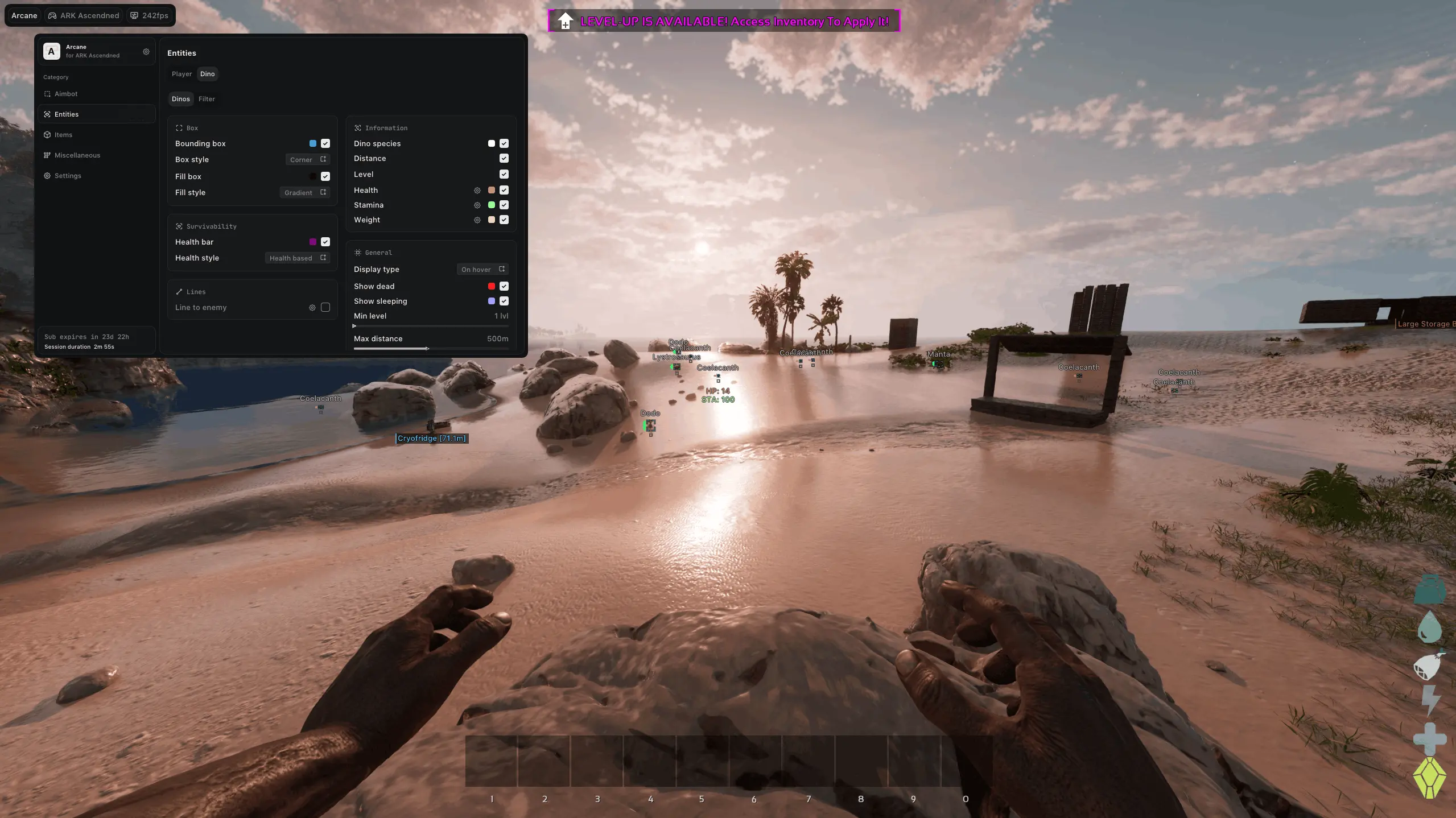
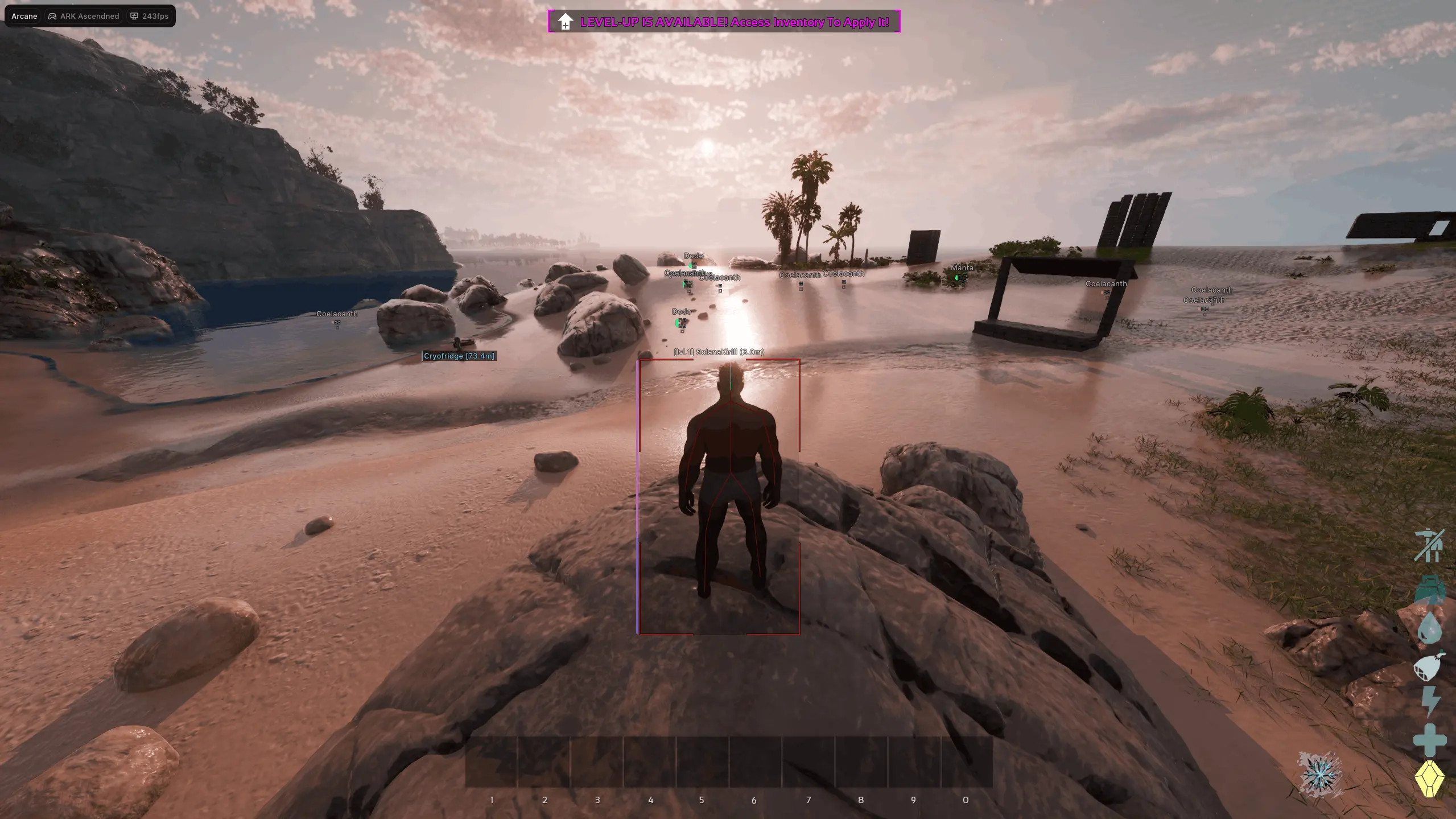
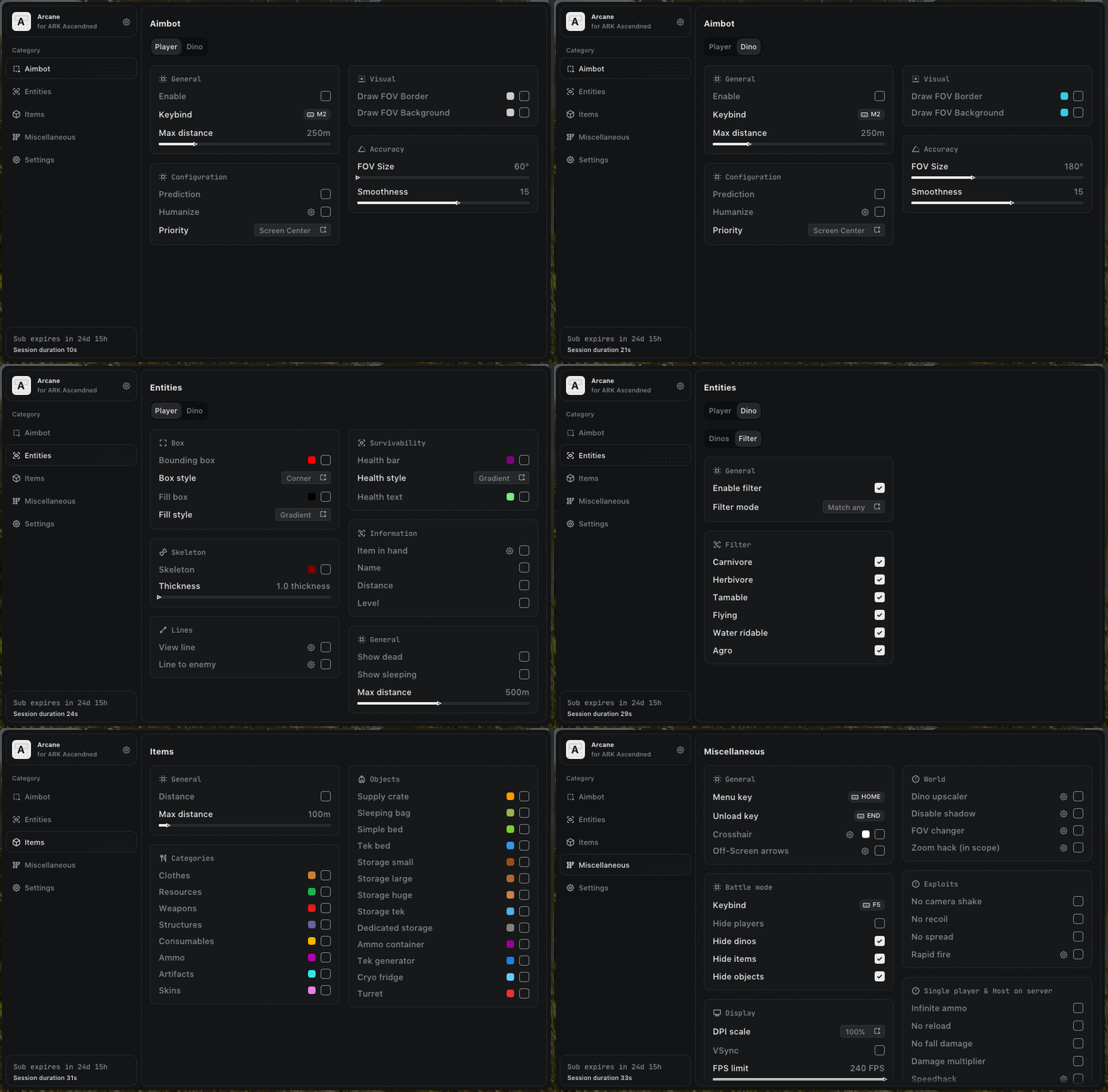
Ark Ascended cheat Arcane is a private solution built for players who want full control, awareness, and efficiency in ARK: Survival Ascended. It combines a powerful and configurable aimbot with detailed ESP for players, dinosaurs, items, and world objects, allowing precise targeting and clear situational awareness. Additional features such as recoil and spread removal, zoom and FOV control, off-screen indicators, and advanced visual filtering enhance gameplay control without unnecessary clutter. With built-in HWID spoofing, StreamProof protection, and regular updates for new patches, Arcane delivers a stable and reliable experience for ARK SA players seeking a well-balanced and feature-rich solution.
- Operating system:Windows 10, Windows 11 (21H2, 22H2, 23H2, 24H2, 25H2)
- Processor:Intel & AMD
- Client: Steam, Epic Games, Microsoft Store (Xbox Gamepass PC)
- Enable Aimbot: Enable or disable the aimbot system.
- Aim Key: Set a custom key to activate the aimbot.
- Aim Mode (Hold / Always): Choose whether the aimbot activates while holding a key or stays always active.
- Targets (Players / Dinos): Configure separate aimbot settings for players and dinosaurs.
- Ignore Targets (Sleeper / Dead): Ignore sleeping or dead targets when aiming.
- Prediction: Predicts target movement trajectory for improved accuracy.
- Humanization: Adds human-like behavior to aimbot movements.
- FOV: Adjust the working radius of the aimbot.
- Draw FOV: Displays the aimbot working area as a circle.
- FOV Color: Customize the color of the aimbot FOV circle.
- Distance: Set the maximum working distance for the aimbot.
- Priority (Screen Center / Distance): Choose target prioritization based on screen center or distance.
- Smooth: Adjust the smoothness level of aimbot movements.
- Box 2D: Displays players using 2D boxes or corner-style boxes.
- Box Filled: Choose box fill type, including static or gradient fill.
- Health Bar: Displays character health using a visual health bar.
- Health Text: Shows character HP level as text.
- Nickname: Displays players’ in-game names.
- Distance: Shows the distance to targets in meters.
- Level: Displays the player’s level.
- Item In Hands: Shows the current item held by the character.
- Show Ammo Count: Displays the amount of ammunition remaining.
- Skeleton: Displays players using skeleton ESP.
- Show Dead: Displays dead players.
- Sleeping: Displays sleeping players.
- Line: Draws lines pointing to player targets.
- View Line: Shows the direction each player is looking.
- Rendering Distance: Sets the maximum distance at which ESP is rendered.
- Box 2D: Displays dinosaurs using 2D boxes or corner-style boxes.
- Box Filled: Choose box fill type, including static or gradient fill.
- Health Bar: Displays dinosaur health using a visual health bar.
- Dino Species: Shows the dinosaur species/type.
- Distance: Shows the distance to dinosaurs in meters.
- Level: Displays the dinosaur’s level.
- Health Text: Shows dinosaur HP level as text.
- Stamina: Displays the dinosaur’s stamina level.
- Weight: Displays the dinosaur’s carried weight.
- Sleeping: Displays sleeping dinosaurs.
- Show Dead: Displays dead dinosaurs.
- Rendering Distance: Sets the maximum render distance for dinosaur ESP.
- Enable: Enable or disable ESP for items and world objects.
- Items: Displays items and loot.
- Objects: Displays environmental objects.
- Categories: Filter displayed objects by category.
- Names: Shows names of displayed objects.
- Distance: Shows the distance to items in meters.
- Max Distance: Sets the maximum working range for this ESP tab.
- Battle Mode: Combat mode that disables all ESP except player ESP.
- Loot: Displays loot dropped on the ground.
- Resources: Displays resources such as wood, metal, stone, and more.
- Structures: Displays buildable structures and placed objects.
- Supply Crate: Displays supply drops.
- Sleeping Places: Displays beds, sleeping bags, and other sleeping places.
- Storages: Displays storage boxes, loot containers, and ammo crates.
- Other Objects: Displays workbenches, machines, turrets, and other world objects.
- Dino Upscaler: Visually enlarges your dinosaur model.
- Disable Shadow: Disables shadows in ARK: Survival Ascended for clearer visibility.
- No Recoil: Removes weapon recoil.
- No Spread: Disables bullet spread so shots land in a tight point.
- Rapid Fire: Enables maximum fire rate for semi-automatic weapons.
- No Camera Shake: Disables camera shake for a steadier view.
- FOV Changer: Increase and customize your field of view.
- Zoom Hack: Use multiple zoom levels without needing optics.
- Crosshair: Displays a static crosshair in the center of the screen.
- Off Screen Arrows: Arrows pointing toward enemies outside your field of view.
- Menu Style: Customize menu colors and scale for Arcane Ark Ascended.
- Language (Russian / English / Chinese): Arcane supports three languages: Russian, English, and Chinese.
- HWID Spoofer: Built-in spoofer to bypass and protect against hardware-based bans.
- StreamProof: Completely hidden from screen recordings, livestreams, and screenshots.
We also recommend looking at: