 Escape From Tarkov
 Arc Raiders
 Arena Breakout
 Delta Force
 Marathon
 GTA V FiveM
 Apex
Apex Gray Zone Warfare
 The Isle
 League Of Legends
 Deadlock
 Marvel Rivals
 Battlefield 6
 The Finals
 Rainbow 6 Siege
 Sea of Thieves
- Call Of Duty
 Pubg
Pubg- Rust
- Dayz
 ARK Ascended
 Arma Reforger
 Fortnite
 Counter Strike 2
 Dead By Daylight
 Squad
Squad Scum
Scum Dark And Darker
- Valorant
- Warthunder
 Hunt Showdown
- DMA Hardware
- Hwid Spoofers

























PussyCat Gray Zone Warfare
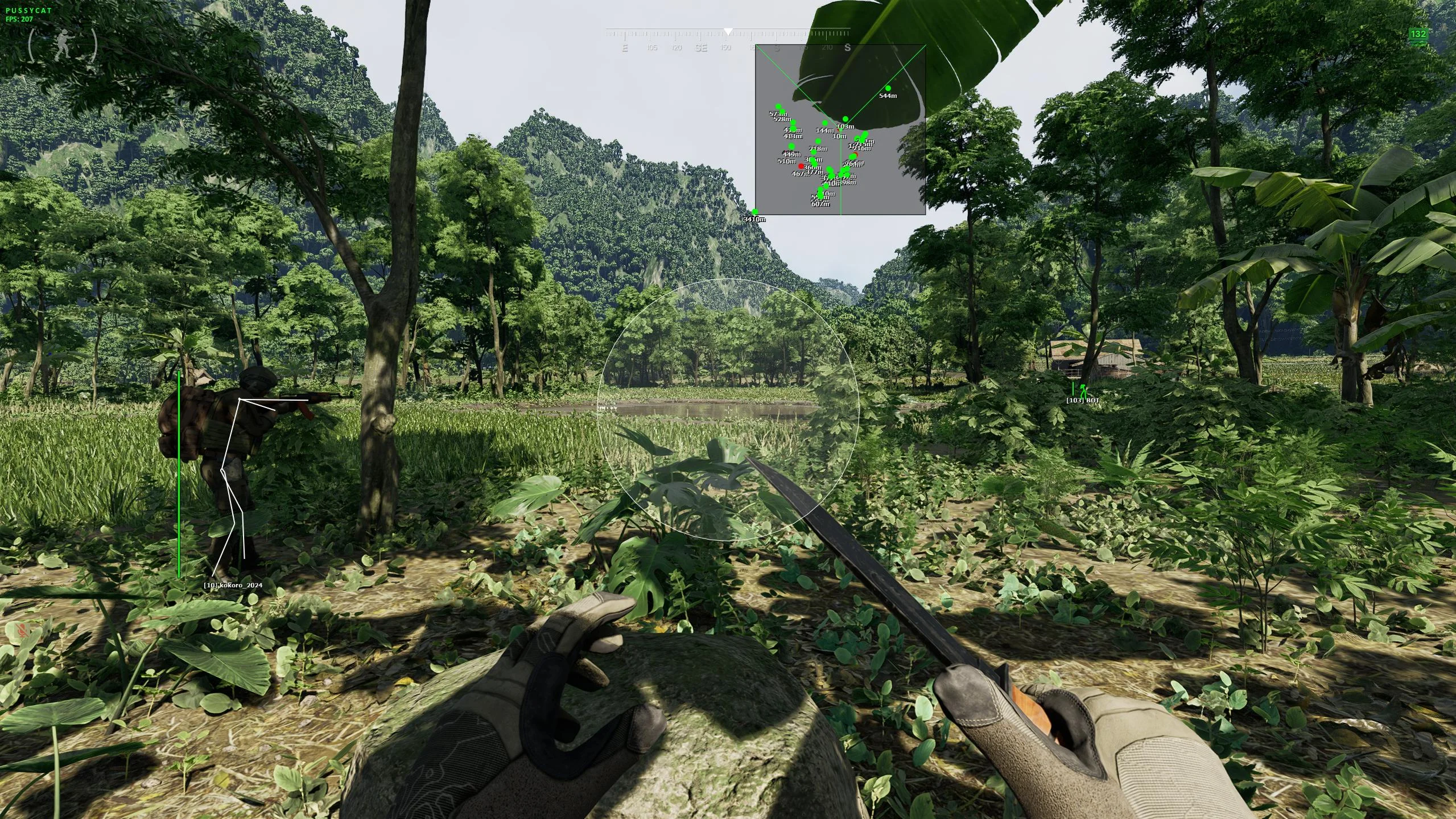
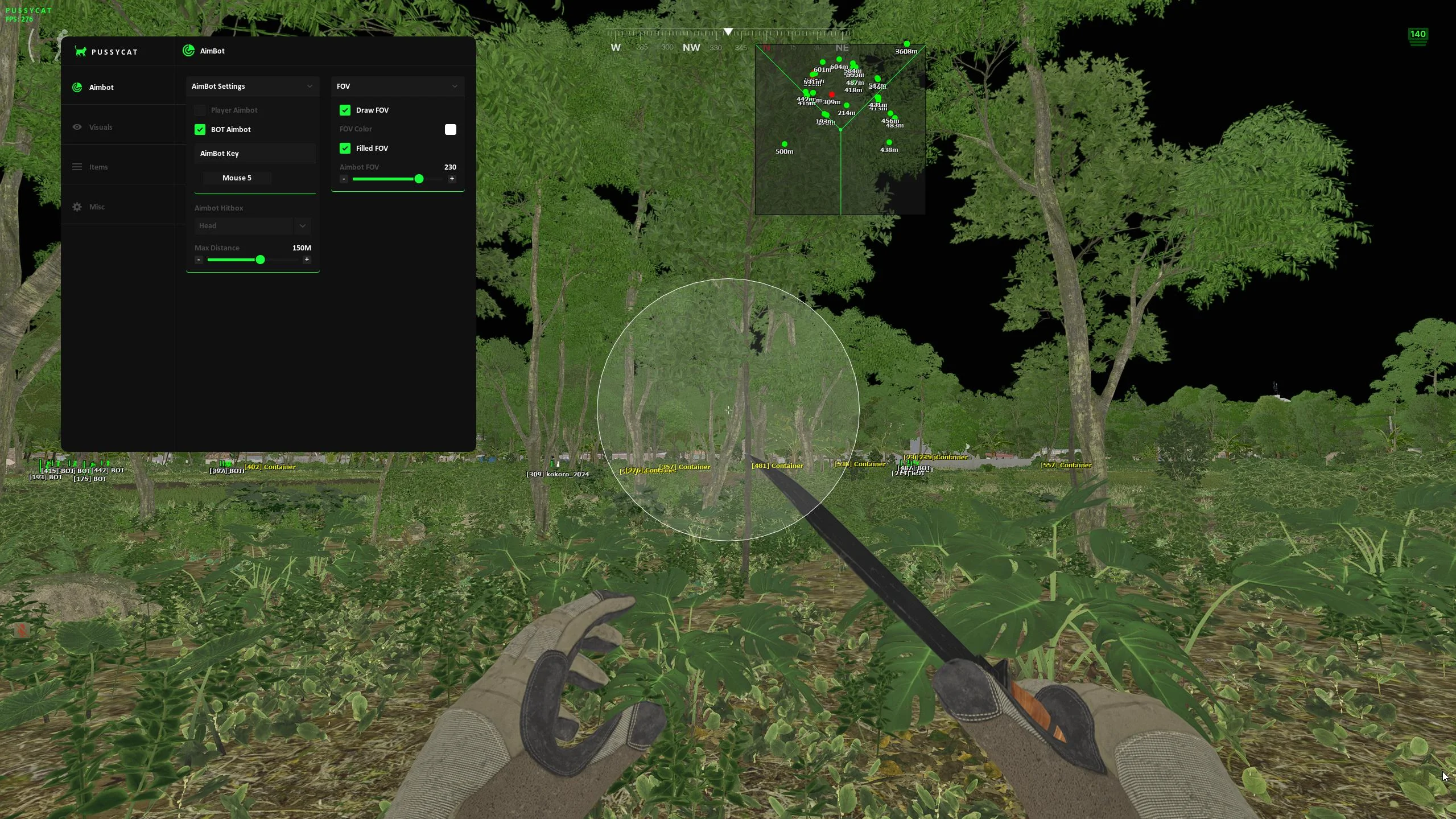
Gray Zone Warfare Cheat PussyCat is a private, streamlined cheat built for precise combat and clear awareness without unnecessary complexity.It includes a responsive aimbot with FOV control, hitbox selection, and support for both players and bots, designed for smooth and consistent performance. The ESP system provides detailed visuals for players, AI, containers, and loot, including health, distance, names, and item values.Loot ESP highlights containers, quest items, and valuable resources, while additional features like radar, custom crosshair, and performance optimizations improve overall gameplay flow. Config support, auto updates, and clean UI controls ensure a fast and reliable experience.Gray Zone Warfare PussyCat delivers a stable, optimized, and easy-to-use solution for consistent results.
- Operating system:Windows 10, Windows 11 (21H2, 22H2, 23H2, 24H2, 25H2)
- Processor:Intel & AMD
- Client: Steam
- Player Targeting:
Enable aimbot for enemy players. - Bot Targeting:
Activate aimbot for AI-controlled enemies. - Aim Key:
Set a custom key to activate the aimbot. - Hitboxes:
Select target areas such as head or body. - FOV:
Adjust the aimbot’s working area. - FOV Draw:
Display the aimbot circle on screen. - FOV Filled:
Fill the FOV circle for better visibility. - Ammo Count:
Shows the current ammo count on screen. - Max Distance:
Set the maximum range for aimbot engagement.
- Players ESP:
Displays enemy players with full visual information. - Bot ESP:
Shows AI-controlled enemies on the ESP. - Box ESP:
Render targets using box visuals for easy tracking. - Box Style:
Choose between full or edge box styles. - Snaplines:
Draw lines to targets for quick awareness. - Snaplines Style:
Customize the visual style of snaplines. - Skeleton ESP:
Display skeletons for precise positioning. - Names:
Show player nicknames directly on screen. - Health:
Displays enemy health as a dynamic bar. - Ignore Team:
Exclude teammates from ESP display. - Containers:
Highlights loot containers across the map. - Max Distance:
Set the ESP rendering range.
- Items ESP:
Displays loot containers, quest items, and valuable objects. - State:
Shows container status such as open or closed. - Price:
Displays item value for quick evaluation. - Weight:
Shows item weight for better inventory management. - Buildings:
Highlights buildings and structures on the map. - Containers:
Displays all types of loot containers. - Collectibles:
Highlights collectible items across the environment. - Quest Items:
Displays mission-related items for easier progression. - Other Items:
Shows additional items not included in main categories. - Other Objects:
Displays miscellaneous objects in the world.
- Radar:
Displays enemies in a separate radar window for better awareness. - Crosshair:
Customizable crosshair with flexible visual settings. - Disable Shadows:
Removes in-game shadows to improve visibility and performance. - Show Ping:
Displays your current server ping in real-time. - Font Settings:
Adjust ESP text size for better readability. - Configs:
Save and load settings quickly for different playstyles. - Menu Key:
Set a keybind to open the menu instantly. - Auto Update:
Automatically updates with minor game patches.